Tuesday, April 18, 2006

MySQL triggers and Master/Detail tables

Have you ever wondered how to update the status of an order to "Closed" when the whole ordered quantity has been received?
If you are on a database that supports triggers like me (I'm on MySQL 5.0.16 right now) you can have something like:

Table structure:

Orders table

  1. DROP TABLE IF EXISTS `test`.`orders`;
  2. CREATE TABLE `test`.`orders` (
  3. `order_id` int(10) UNSIGNED NOT NULL AUTO_INCREMENT,
  4. `order_date` datetime DEFAULT NULL,
  5. `order_status` CHAR(1) NOT NULL DEFAULT '',
  6. PRIMARY KEY (`order_id`)
  7. ) ENGINE=InnoDB DEFAULT CHARSET=utf8;

Order lines table

  1. DROP TABLE IF EXISTS `test`.`order_lines`;
  2. CREATE TABLE `test`.`order_lines` (
  3. `order_id` int(10) UNSIGNED NOT NULL DEFAULT '0',
  4. `order_line_id` int(10) UNSIGNED NOT NULL AUTO_INCREMENT,
  5. `item` varchar(45) NOT NULL DEFAULT '',
  6. `order_quantity` float NOT NULL DEFAULT '0',
  7. PRIMARY KEY (`order_line_id`,`order_id`),
  8. KEY `FK_order_lines_1` (`order_id`),
  9. CONSTRAINT `FK_order_lines_1` FOREIGN KEY (`order_id`) REFERENCES `orders` (`order_id`)
  10. ) ENGINE=InnoDB DEFAULT CHARSET=utf8;

Order deliveries table

  1. DROP TABLE IF EXISTS `test`.`order_schedule_lines`;
  2. CREATE TABLE `test`.`order_schedule_lines` (
  3. `order_id` int(10) UNSIGNED NOT NULL DEFAULT '0',
  4. `order_line_id` int(10) UNSIGNED NOT NULL DEFAULT '0',
  5. `schedule_line_id` int(10) UNSIGNED NOT NULL DEFAULT '0',
  6. `delivery_quantity` float NOT NULL DEFAULT '0',
  7. PRIMARY KEY (`order_id`,`order_line_id`,`schedule_line_id`),
  8. CONSTRAINT `FK_order_schedule_lines_1` FOREIGN KEY (`order_id`, `order_line_id`) REFERENCES `order_lines` (`order_id`, `order_line_id`)
  9. ) ENGINE=InnoDB DEFAULT CHARSET=utf8;

You see, a lot of nice things, InnoDB tables, Foreign Keys ...
But now the real meat, a trigger that, after every insert in the "order_schedule_lines" table, where deliveries for each order line are kept, will compute the difference between ordered quantity and delivered quantity and will update the order status to closed when that difference is 0.

Trigger code:

  1. DELIMITER $$
  2. DROP TRIGGER test.close_order $$
  3. CREATE TRIGGER close_order
  4. AFTER INSERT
  5. ON order_schedule_lines
  6. FOR EACH ROW
  7. BEGIN
  8. DECLARE a float;
  9. SELECT
  10. (ol.order_quantity - COALESCE(SUM(osl.delivery_quantity), 0)) INTO a
  11. FROM orders o
  12. INNER JOIN order_lines ol ON o.order_id = ol.order_id
  13. LEFT OUTER JOIN order_schedule_lines osl ON ol.order_id = osl.order_id AND ol.order_line_id = osl.order_line_id
  14. WHERE osl.order_id = NEW.order_id
  15. GROUP BY
  16. o.order_id;
  17. IF a = 0 THEN
  18. UPDATE orders SET order_status = 'C' WHERE order_id = NEW.order_id;
  19. END IF;
  20. END $$
  21. DELIMITER ;

Of course it would be good to have another check (a before insert trigger? ;-)) that prevents further deliveries on closed orders ...

Partly inspired by this blog entry

Wednesday, April 12, 2006

Php PDO and Firebird

A quick snippet ...

  1. try {
  2. $dbh = new PDO("firebird:dbname=localhost:C:\\Programmi\\Firebird\\Firebird_2_0\\examples\\empbuild\\EMPLOYEE.FDB", "SYSDBA", "masterkey");
  3. foreach ($dbh->query('SELECT COUNTRY from COUNTRY') as $row) {
  4. print_r($row);
  5. }
  6. $dbh = null;
  7. } catch (PDOException $e) {
  8. print "Error!: " . $e->getMessage() . "
    "
    ;
  9. die();
  10. }
  11. ?>

Tuesday, April 11, 2006

Php Firebird (ehm Interbase) functions ...

A post on Devshed forums showed that the php manual did not have any detailed info about ibase_service_attach and some other Interbase/Firebird functions, of course the question has been answered in the forums and the user promised to add a note on the official docs, anyway here is a small example of use of that specific function:
...
// get server version and implementation strings
if (($service = ibase_service_attach('localhost', 'sysdba', 'masterkey')) != FALSE) {
$server_info = ibase_server_info($service, IBASE_SVC_SERVER_VERSION)
. ' / '
. ibase_server_info($service, IBASE_SVC_IMPLEMENTATION);
ibase_service_detach($service);
}
else {
$ib_error = ibase_errmsg();
}
echo $server_info;

...

Which echoes something like

WI-T2.0.0.12484 Firebird 2.0 Release Candidate 1 / Firebird/x86/Windows NT

A more useful example would be using the whole thing to create a new user, you'll have to attach to server as a user with appropriate privileges (like SYSDBA) and then issue an:

ibase_add_user($service, 'pippo', 'pp')


where $service is the resorce got from the ibase_service_attach, 'pippo' is the username and 'pp' is the password


Sample code taken and adapted from the ibWebAdmin source code.

Replicating from MsSQL Server to PostgreSQL

Very interesting post from Magnus Hagander, take a look at it.

Saturday, April 01, 2006

OpenLDAP Win32

Good news for OpenLDAP fans!!
Lucas Bergman with help from Matthias Mohr has put up a win32 build of OpenLDAP 2.2.29.
Thank you very much and keep up the good work.

Saturday, March 18, 2006

Small Firebird trigger example

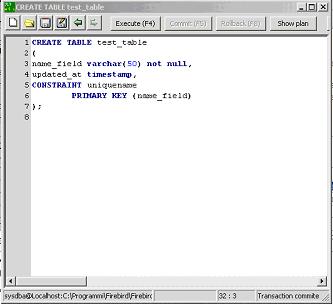
After reading a post in the Firebird forum at Devshed I immediately put up a small example about writing a trigger (and also upgraded my favourite tool, Flamerobin, to the latest version) , here it goes:

1. Create an empty table


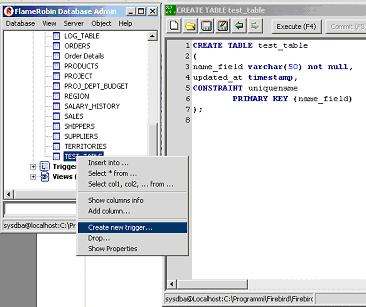
2. Create the trigger on it using Flamerobin's guided menu


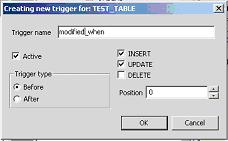
As you can see the menu will guide you through defining the trigger name, to activate it (in other words you can deactivate triggers without deleting them), setting it to fire before or after a DML statement (insert/update/delete) and also define it's position, which means that many triggers with the same action (i.e. "before insert") can exist on the same table and the position will tell the firing order.
Now the trigger code:

SET TERM ^ ;

CREATE TRIGGER modified_when FOR TEST_TABLE
ACTIVE BEFORE INSERT OR UPDATE POSITION 0
AS
BEGIN
/* enter trigger code here */
NEW.updated_at = CURRENT_TIMESTAMP;

END^

SET TERM ; ^


Note that after every DML and DDL statement you need to commit to make changes effective.
Now the test phase, I'll insert a dummy row:

insert into test_table (name_field) values ('pippo');

And check for the insert result completed by the trigger action:


See the result? ;-)

More infos about triggers in Firebird can be found in this article.

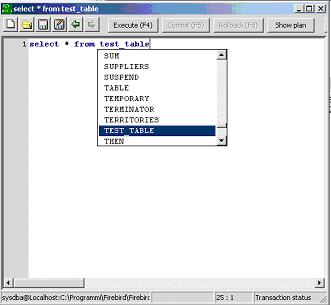
BTW: isn't Flamerobin's code autocompletion great?

Tuesday, March 14, 2006

GIMP 2.3.7 on WinXP

After many difficulties with preceding development releases I finally succeeded in compiling The GIMP on WinXP with MinGW.
Right now I only used a simple --configure --disable-print --disable-python --prefix=/d/gimp237 but I'll try with more complex config options and also adding littlecms to the pack, see some screenshots below

Thursday, March 09, 2006

MySQL Workbench 1.0.5 beta ...

... nice, but not quite there yet.
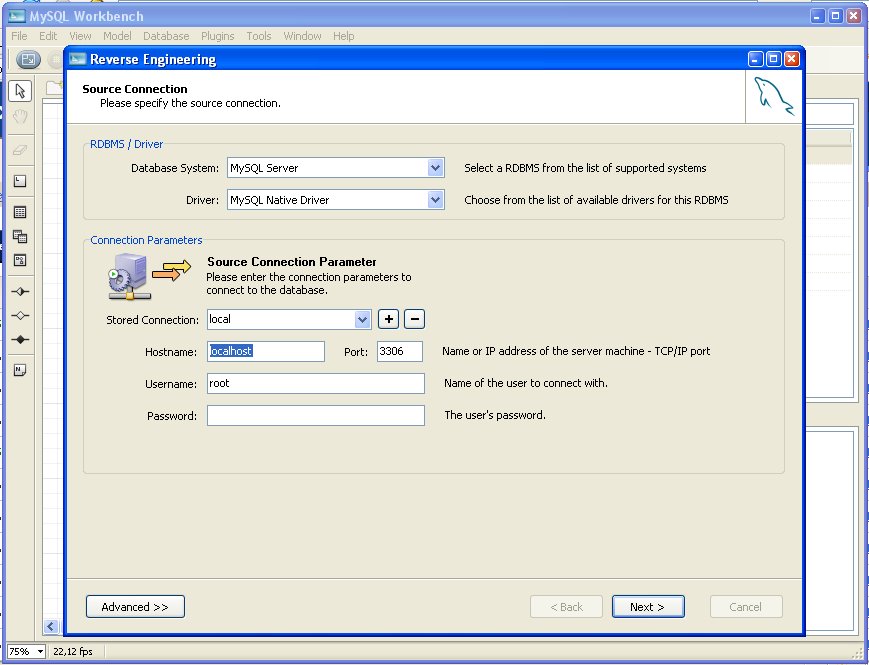
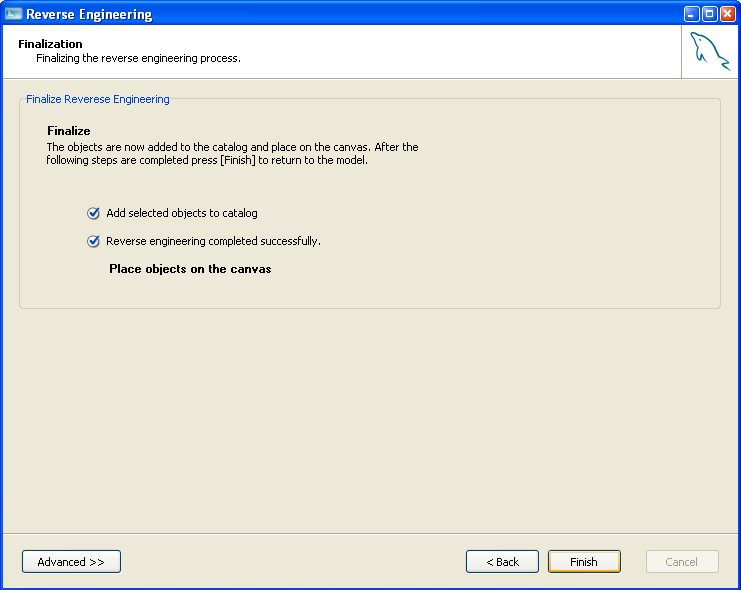
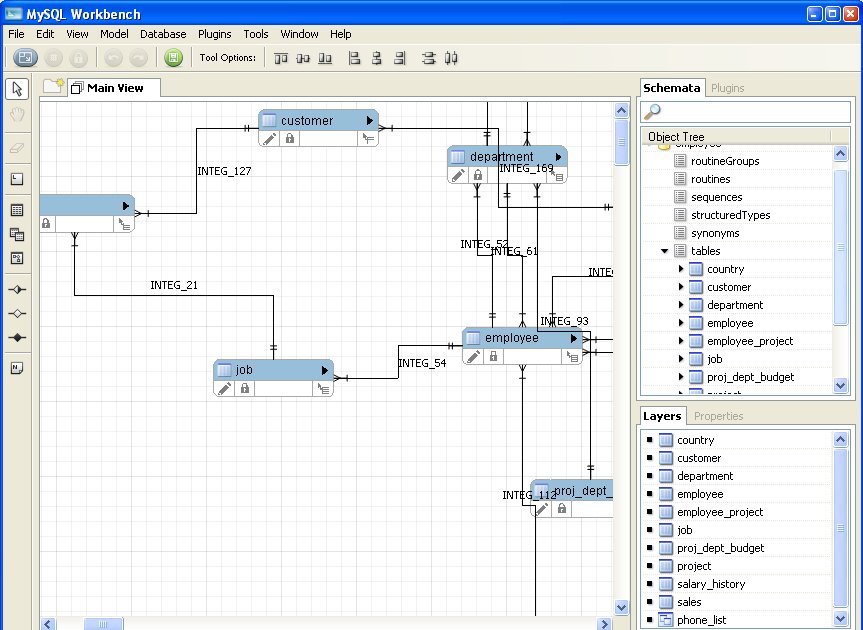
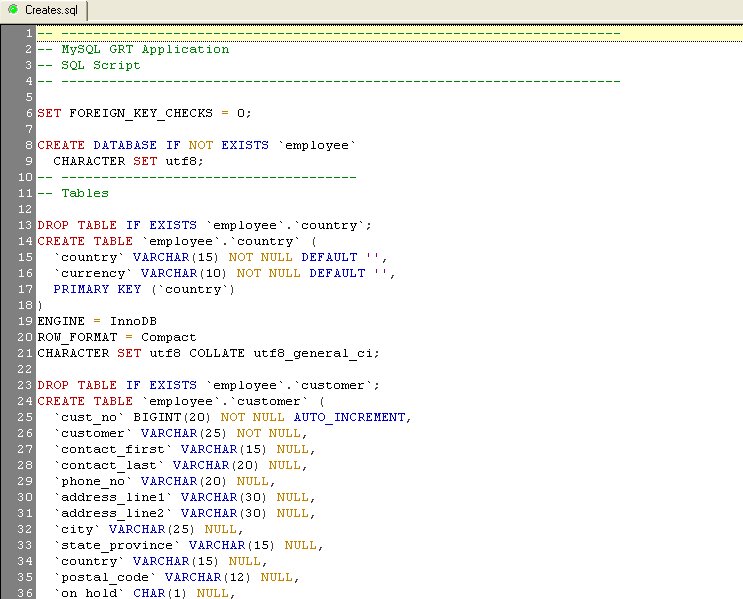
I mean, it has a clean look at I processed the ported Firebird Employee database of my previous posts to check it's reverse engineering abilities, everything went smooth for tables and views (and foreign keys too!), but unfortunately no triggers and stored procs where reverse engineered.
Here is the visual cronicle:

Connection to database:


After the connection MySQL Workbench does a first roundtrip to retrieve structures:


Once structures are retrieved it offers you the option to choose which database to revers:


Right after the database selection you are asked to specify which objects belonging to it are going to be reverse engineered:


Reverse engineering is done:


Checking the result:


Exporting to sql:


Bye ;-)

Saturday, February 25, 2006

iPod enabled tie


Look at this great tie!! I want it.

TOra alive and well, releases v. 1.3.21

TOra 1.3.21 is out, release notes:

Notes:
1.3.21:

2006-02-08: Applied patch from Pawe=B3 Kucharczyk
to fix storage queries used against Ora 10gR2.
2006-02-18: Readded Check Syntax to SQL Worksheet
(many thanks to Sergei Kuchin of otl)
2006-02-18: minor changes to PL/SQL Debugger.
Solved a bug where the debugger stops on every call of a stored function,
now when compiling the current position of the cursor is mantained
2006-02-18: Now when you open the search and replace dialog,
the focus is always on the search field

After the olympics ... ski mountaineering championships!

Friday, February 17, 2006

The case for function based indexes

Since a lot of codes are "speaking codes" (...) meaning that they can be split into fixed meaningful substrings I often see queries like this:

select
*
from
t_table
where
c_code like 'DD6%'


which is highly inefficient, look at it's explain plan:

Seq Scan on t_table (cost=100000000.00..100000001.06 rows=1 width=33)
Filter: (((c_code)::text ~~ 'DD6%'::text)


Since the first 3 chars only are meaningful, you can exploit one of the great features of PostgreSQL, function based indexes, create an index like this:

CREATE INDEX t_table_c_code_part_idx
ON t_table (substring(c_code, 1, 3));


and change the query to:

select
*
from
t_table
where
substring(postcode, 1, 3) = 'DD6'


Now look at the explain plan again:

Index Scan using t_table_postcode_part_idx on t_table (cost=0.00..4.69 rows=1 width=33)
Index Cond: ("substring"((postcode)::text, 1, 3) = 'DD6'::text)


WOW, the index is correctly picked up and query efficiency is greately enhanced!!!

Saturday, February 11, 2006

Borland to dismiss Interbase (again)?

An email from the Italian branch of Borland Developer News announced that Borland is to dismiss a lot of it's more traditional business, including Interbase (no mention of it in Tod Nielsen's letter) .
Time to switch the remaining Interbase customers to Firebird?

Tuesday, February 07, 2006

TOra 1.3.20 is out

Great news for all Oracle users, after the release of a free version of Oracle 10g (named Oracle Database 10g Express Edition) which is free to develop, deploy and distribute, we now have a new version of the great opensource management tool for Oracle, TOra 1.3.20, which nicely complements the free database and will hopefully take the place of the free version of TOAD on my PC.
More on this later, but the connection test to Oracle 10g Express has been successful ;-)

Friday, February 03, 2006

Porting the EMPLOYEE database from Firebird 2.0 to MySQL 5.1 part 8

A more interesting example:

SET TERM ^ ;
CREATE PROCEDURE ADD_EMP_PROJ (
EMP_NO Smallint,
PROJ_ID Char(5) )
ASBEGIN
BEGIN
INSERT INTO employee_project (emp_no, proj_id) VALUES (:emp_no, :proj_id);
WHEN SQLCODE -530 DO
EXCEPTION unknown_emp_id;
END
SUSPEND;
END^
SET TERM ; ^


This procedure makes use of exceptions to manage errors, MySQL currently doesn't support them but equivalent can be achieved with condition handlers
and variables, see below:

DELIMITER $$

DROP PROCEDURE IF EXISTS `employee`.`add_emp_proj` $$
CREATE PROCEDURE `employee`.`add_emp_proj` (IN empno smallint, IN projid char(5), OUT error char(5))
BEGIN
DECLARE CONTINUE HANDLER FOR SQLEXCEPTION SET error = 'error';

-- DECLARE EXIT HANDLER FOR SQLEXCEPTION ROLLBACK
SET @add_emp_proj = concat('INSERT INTO employee_project (emp_no, proj_id) VALUES (', empno, ',', projid, ')');
PREPARE `add_emp_proj` FROM @add_emp_proj;
EXECUTE `add_emp_proj`;
DEALLOCATE PREPARE `add_emp_proj`;
END $$

DELIMITER ;


there is also a more radical handler commented out.
This procedure shows usage of prepared statements in sps and also usage of a variable to check procedure
execution status, see it in action:

mysql> set @error = 'none';
Query OK, 0 rows affected (0.00 sec)

mysql> select @error from dual;
+--------+
| @error |
+--------+
| none |
+--------+
1 row in set (0.00 sec)

mysql> CALL add_emp_proj(2, '5', @error);
Query OK, 0 rows affected (0.00 sec)

mysql> select @error from dual;
+--------+
| @error |
+--------+
| error |
+--------+
1 row in set (0.00 sec)

mysql>

Porting the EMPLOYEE database from Firebird 2.0 to MySQL 5.1 part 7

Trying to keep pace with work and porting Firebird stored procs to MySQL can be really hard ... anyway here are two sp's translated:

Firebird procedure to list some stats for departments by department head:

SET TERM ^ ;
CREATE PROCEDURE SUB_TOT_BUDGET (
HEAD_DEPT Char(3) )
RETURNS (
TOT_BUDGET Decimal(12,2),
AVG_BUDGET Decimal(12,2),
MIN_BUDGET Decimal(12,2),
MAX_BUDGET Decimal(12,2) )
ASBEGIN
SELECT SUM(budget), AVG(budget), MIN(budget), MAX(budget)
FROM department
WHERE head_dept = :head_dept
INTO :tot_budget, :avg_budget, :min_budget, :max_budget;
SUSPEND;
END^
SET TERM ; ^

So Firebird seems to be a bit more verbose, with complete declaration of parameters.
Here is the MySQL translation:

DELIMITER $

DROP PROCEDURE IF EXISTS `employee`.`sub_tot_budget` $$
CREATE PROCEDURE `employee`.`sub_tot_budget` (IN head_dept char(3))
BEGIN
SELECT SUM(d.budget), AVG(d.budget), MIN(d.budget), MAX(d.budget)
FROM department d
WHERE head_dept = head_dept;
END $$

DELIMITER ;


As you can see syntax is quite similar but more compact.

Now another one, a procedure to list the first five languages required for a job:

SET TERM ^ ;
CREATE PROCEDURE SHOW_LANGS (
CODE Varchar(5),
GRADE Smallint,
CTY Varchar(15) )
RETURNS (
LANGUAGES Varchar(15) )
ASDECLARE VARIABLE i INTEGER;
BEGIN
i = 1;
WHILE (i <= 5) DO BEGIN SELECT language_req[:i] FROM joB WHERE ((job_code = :code) AND (job_grade = :grade) AND (job_country = :cty) AND (language_req IS NOT NULL)) INTO :languages; IF (languages = ' ') THEN /* Prints 'NULL' instead of blanks */ languages = 'NULL'; i = i +1; SUSPEND; END END^ SET TERM ; ^


Probably the employee.fdb database hasn't changed from the old Firebird 1 (and InterBase) days, note the workaround used to get the first 5 languages, it's now superseded by the FIRST ... SKIP clause introduced in Firebird 1.5 which is equivalent to MySQL's LIMIT clause.

The MySQL version is:

DELIMITER $

DROP PROCEDURE IF EXISTS `employee`.`show_langs` $$
CREATE PROCEDURE `employee`.`show_langs` (IN code varchar(5), IN grade SMALLINT, IN cty varchar(15))
BEGIN
SELECT j.language_req FROM job j
WHERE j.job_code = code AND j.job_grade = grade AND j.job_country = cty
LIMIT 5;
END $$

DELIMITER ;

The sintax is similar again, still I find Firebird procs a bit more readable ...

Another easy take:


SET TERM ^ ;
CREATE PROCEDURE GET_EMP_PROJ (
EMP_NO Smallint )
RETURNS (
PROJ_ID Char(5) )
ASBEGIN
FOR SELECT proj_id
FROM employee_project
WHERE emp_no = :emp_no
INTO :proj_id
DO
SUSPEND;
END^
SET TERM ; ^


Becomes:

DELIMITER $$

DROP PROCEDURE IF EXISTS `employee`.`get_emp_proj` $$
CREATE PROCEDURE `employee`.`get_emp_proj` (IN empno SMALLINT)
BEGIN
SELECT proj_id FROM employee_project WHERE emp_no = empno;
END $$

DELIMITER ;

Wednesday, February 01, 2006

Porting the EMPLOYEE database from Firebird 2.0 to MySQL 5.1 part 6

More on foreign keys in MySQL:

After all those FK added I can only recommend to check that columns have the same datatype, if this is not true MySQL will spit strange error messages like "can't create table ..." when trying to add foreign keys.

Foreign keys are not deferrable in MySQL so the circular reference between employee and department tables makes impossible to load employee before dept and impossible to load dept before loading employee.
As those tables are innodb i can't issue an "alter table disable keys" so I'll
have to resolve the circular fk relationship between those tables and use triggers to
enforce referential integrity (keys INTEG_61 and INTEG_52 will be deleted and substituded with triggers).
A simpler workaround useful for massive data loads is to issue a "set foreign_key_checks=0" before loading and then a "set foreign_key_checks=1" after load.

Tuesday, January 31, 2006

Porting the EMPLOYEE database from Firebird 2.0 to MySQL 5.1 part 5

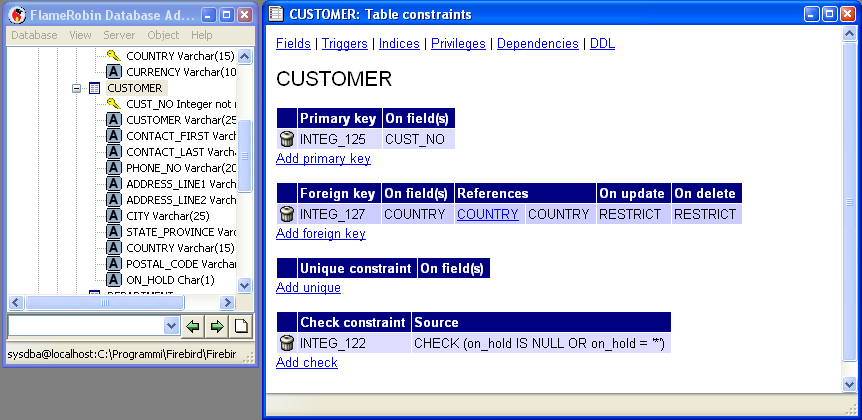
Having used InnoDB table handler in MySQL to be on par with Firebird capabilities I'm going to add foreign keys, unique constraints and check constraints and indexes to the tables migrated in MySQL.
Here is a screenshot of Flamerobin showing constraints for table CUSTOMER.

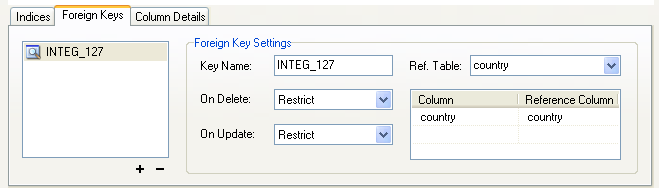
First of all I'll add the foreign key constraints, here is MySQL's syntax:
ALTER TABLE `employee`.`customer` ADD CONSTRAINT `INTEG_127` FOREIGN KEY `INTEG_127` (`country`)
REFERENCES `country` (`country`) ON DELETE RESTRICT ON UPDATE RESTRICT;

A nice graphical representation is in this screenshot of MySQLQueryBrowser showing the same constraint.


Another nice thing, foreign keys referencing the same table are supported in both databases, see this example:

ADD CONSTRAINT `INTEG_35` FOREIGN KEY `INTEG_35` (`head_dept`)
REFERENCES `department` (`dept_no`)
ON DELETE CASCADE
ON UPDATE RESTRICT;

Note that those constraints imply an index with the same name on the referencing field.
Of course unique constraints are supported, like:


ALTER TABLE `employee`.`department` ADD UNIQUE `INTEG_30`(`department`);

Multi-column constraints also work fine in both databases:

ALTER TABLE `employee`.`employee` ADD CONSTRAINT `INTEG_54` FOREIGN KEY `INTEG_54` (`job_code`, `job_grade`, `job_country`)
REFERENCES `job` (`job_code`, `job_grade`, `job_country`)
ON DELETE RESTRICT
ON UPDATE RESTRICT;

Porting the EMPLOYEE database from Firebird 2.0 to MySQL 5.1 part 4

Now the next trigger, it will be an AFTER INSERT trigger, so to fire after the previous one has inserted a row, obviously an after insert trigger can reference old and new data but can't modify them.
So, on with the code:

DELIMITER $
-- DROP TRIGGER new_salary $$

CREATE TRIGGER new_salary AFTER INSERT ON salary_history
FOR EACH ROW BEGIN
UPDATE salary_history SET new_salary = (new.old_salary + new.old_salary * new.percent_change / 100) WHERE emp_no = new.emp_no;
END $$


The other trigger "POST_NEW_ORDER" posts an event named 'new_order', events are used by Firebird (and Interbase) server to notify clients about changes in database states (more on events in this whitepaper) as this feature is not present in MySQL and it's closely related to the application layer I won't even try to reproduce it.
So, right now I've reproduced table structures (whenever possible), views, triggers (whenever possible), in the next part I'll add foreign keys to the tables and start looking at stored procedures.

Monday, January 30, 2006

Porting the EMPLOYEE database from Firebird 2.0 to MySQL 5.1 part 3

Ok, on with triggers, I'll start migrating the existing triggers then I'll look at triggers as a workaround for computed columns.
Firebird syntax for SAVE_SALARY_CHANGE trigger (active AFTER UPDATE) on table EMPLOYEE is:

...
BEGIN IF (old.salary <> new.salary) THEN
INSERT INTO salary_history
(emp_no, change_date, updater_id, old_salary, percent_change)
VALUES (
old.emp_no,
'NOW',
user,
old.salary,
(new.salary - old.salary) * 100 / old.salary);
END


Now in MySQL terms it becomes:

CREATE TRIGGER save_salary_change AFTER UPDATE ON employee
FOR EACH ROW BEGIN
IF (old.salary <> new.salary) THEN

INSERT INTO salary_history
(emp_no, change_date, updater_id, old_salary, percent_change)
VALUES ( old.emp_no,
now(),
user(),
old.salary,
(new.salary - old.salary) * 100 / old.salary);
END IF;
END $$


As you can see syntax is quite similar, the only differencies are highlighted in red.
Nice, isn't it?
In this specific case I see that the calculated column of table sales_history recomputes the new salary using the old one and the percent change just inserted by the procedure above, so, instead of implementing another trigger I could just modify this to insert the correct values, but I'll build the second trigger just to keep the cascading trigger sequence.

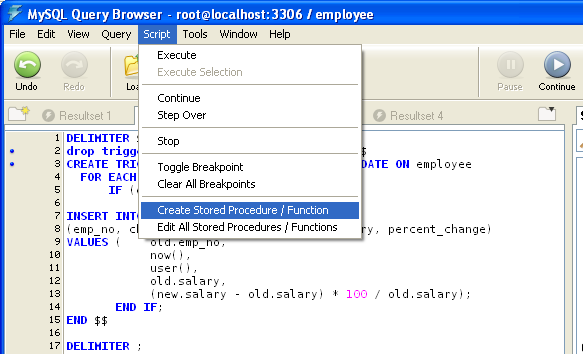
Now, not to be too picky on MySQL QueryBrowser, but it's lacking the appropriate "create trigger" option, so you'll have to create what follows by hand and it's also missing (al least in version 1.1.19) the appropriate infrastructure to graphically show triggers.

Porting the EMPLOYEE database from Firebird 2.0 to MySQL 5.1 part 2

More on calculated columns, here is the create table statement for one of Firebird's Employee.fdb database:

CREATE TABLE SALARY_HISTORY (
EMP_NO EMPNO NOT NULL,
CHANGE_DATE DATE DEFAULT 'NOW' NOT NULL,
UPDATER_ID VARCHAR(20) NOT NULL,
OLD_SALARY SALARY NOT NULL,
PERCENT_CHANGE DOUBLE PRECISION DEFAULT 0 NOT NULL
CHECK (PERCENT_CHANGE BETWEEN -50 AND 50),

NEW_SALARY COMPUTED BY
(OLD_SALARY + OLD_SALARY * PERCENT_CHANGE / 100),

PRIMARY KEY (EMP_NO, CHANGE_DATE, UPDATER_ID),
FOREIGN KEY (EMP_NO) REFERENCES EMPLOYEE (EMP_NO));

I'd go for a trigger based implementation.

After this I'll look at implementing checks and foreign keys (color coding to highlight relevant code samples, I know it can be ugly ;-))

Porting the EMPLOYEE database from Firebird 2.0 to MySQL 5.1 part 1


Hi, I've decided to make an in depth test of MySQL's new functionalities by porting Firebird's EMPLOYEE.FDB database to MySQL 5.1.5, here is what I found, I hope it will be useful for people porting apps from MySQL to Firebird and vice-versa.
First of all, a screenshot (taken from Firebird's excellent Flamerobin admin tool) showing the actual employee.fdb structure.
Note the presence of generators, (aka sequences) won't be available in MySQL, I'll mimic them with autoincrement fields.
Also, look at triggers, two of them ("set_cust_no" and "set_emp_no") are used to implement an autoincrement-like key in tables, again there is no need to even try to reimplement them in MySQL.
Also, at first I won't try to implement domains, exceptions and calculated columns as I'm not aware of a clean implementation for them in MySQL.
Here is a screenshot of the first migration phase, I reproduced table structures, and views.
First of all the good news, I've always found data types equivalent for every table, and actually the views are even easier to create in MySQL than in Firebird, as you don't have to list all columns:

Firebird: CREATE VIEW PHONE_LIST (EMP_NO, FIRST_NAME, LAST_NAME, PHONE_EXT, LOCATION, PHONE_NO)
AS SELECT ...


MySQL: CREATE VIEW `employee`.`phone_list` AS select `employee`.`emp_no` ...

Bad news, I've not found an equivalent for calculated columns, I suspect the best workaround will be to mimic them using a trigger (updateable views should also do the trick).

Sunday, January 29, 2006

Discordian Date for MySQL

Here is a MySQL version of a function to convert from gregorian to discordian dates.

DELIMITER $

DROP FUNCTION IF EXISTS `test`.`toDiscordian` $
CREATE FUNCTION `toDiscordian`(gdate DATE) RETURNS varchar(50)
DETERMINISTIC
COMMENT 'Discordian Date Converter'
BEGIN

SET @year = EXTRACT(YEAR FROM gdate);
SET @dyear = @year + 1166;
SET @month = EXTRACT(MONTH FROM gdate);
SET @mday = DAYOFMONTH(gdate);
SET @yday = DAYOFYEAR(gdate);
SET @dseason = round(@yday/73);

CASE @dseason
WHEN 0 THEN SET @a_holiday = 'Mungday';
WHEN 1 THEN SET @a_holiday = 'Mojoday';
WHEN 2 THEN SET @a_holiday = 'Syaday';
WHEN 3 THEN SET @a_holiday = 'Zaraday';
WHEN 4 THEN SET @a_holiday = 'Maladay';
ELSE SET @a_holiday = 'Error in a_holiday';
END CASE;

CASE
@dseason
WHEN
0 THEN SET @s_holiday = 'Chaoflux';
WHEN
1 THEN SET @s_holiday = 'Discoflux';
WHEN
2 THEN SET @s_holiday = 'Confuflux';
WHEN
3 THEN SET @s_holiday = 'Bureflux';
WHEN
4 THEN SET @s_holiday = 'Afflux';
ELSE SET @s_holiday = 'Error in s_holiday';
END CASE;

CASE
@dseason
WHEN
0 THEN SET @name_season = 'Chaos';
WHEN
1 THEN SET @name_season = 'Discord';
WHEN
2 THEN SET @name_season = 'Confusion';
WHEN
3 THEN SET @name_season = 'Bureaucracy';
WHEN
4 THEN SET @name_season = 'The Aftermath';
ELSE SET @name_season = 'Error in name_season';
END CASE;

SET
@dday=round((@yday-(73*@dseason))+1);

CASE mod(
@dday, 10)
WHEN
1 THEN SET @dday = concat(@dday, 'st');
WHEN
2 THEN SET @dday = concat(@dday, 'nd');
WHEN
3 THEN SET @dday = concat(@dday, 'rd');
ELSE SET
@dday = concat(@dday, 'th');

END CASE;

CASE mod(
@yday, 5)
WHEN
0 THEN SET @dweekday = 'Sweetmorn';
WHEN
1 THEN SET @dweekday = 'Boomtime';
WHEN
2 THEN SET @dweekday = 'Pungenday';
WHEN
3 THEN SET @dweekday = 'Prickle-Prickle';
WHEN
4 THEN SET @dweekday = 'Setting Orange';
ELSE SET
@dweekday = 'Error in dweekday';
END CASE;

CASE
WHEN @dday =
5 THEN SET @celebrate = concat(' Celebrate ', @a_holiday, '.');
WHEN @dday =
50 THEN SET @celebrate = concat(' Celebrate ', @s_holiday, '.');
WHEN (@month = 2 and @mday = 29) THEN SET @celebrate = ' Celebrate St. Tib''s Day.';
ELSE SET @celebrate = '';
END CASE;

SET @ddate = concat(@dweekday, ', ', @dday, ' ', @name_season, ', ', @dyear, '.', @celebrate);

RETURN @ddate;

END $$

DELIMITER ;

You can test it with a simple

SQL>SELECT toDiscordian(now());

It is certainly far from perfect, feel free to improve it and report errors.

Saturday, January 28, 2006

Changelog to the people

Right now two other guys added their voice to mine in this feature request to MySQL AB for a public changelog of MySQL QueryBrowser.
Please add your comments too, if interested in it.

Going wireless!!!!

If you live in Europe, as I do, don't think twice about it, go to eBay for your wi-fi gear.
Now I'm on a cheap used (??) Linksys BEFW1154 which works very well.

On with MySQL 5.1

Eager to experiment ... I installed MySQL 5.1.5 on my laptop, in place of an existing MySQL 5.0.x installation from which I borrowed the my.ini file, the outcome has been bug 16781 at MySQL AB, the new one doesn't seem to like this row in the ini file:

# The default storage engine that will be used when create new tables
default-storage-engine=InnoDB

Tuesday, January 24, 2006

A better PHPBB schema

I've just modified the phpBB schema for PostgreSQL by:
  1. Taking it from phpBB 2.0.18
  2. Placing everything in the "phpbb" schema
  3. The schema is referred to a role (owner) named "phpbb"
  4. There is some sample data in it (rubbish) you can login as "Admin" password "admin"
  5. Now the most relevant changes:
    1. Added foreign keys
    2. Added unique constraints
    3. Tested on PostgreSQL 8.1 win32
Downloadable here

Hope it helps!!
I'm looking forward to improve it from a performance point of view by proper indexing,
stay tuned for updates.

Saturday, January 21, 2006

Select a random row from a table with Firebird

After reading this page I noticed that Firebird was missing, so I had to add this little bit of info.
In order to select a random row from a table in Firebird you need to first install an UDF that provides the rand() function, which is ib_udf, it comes for free with the server, but it's not installed by default.
So execute the appropriate sql script to install a bunch of UDFs (ib_udf.sql and fbudf.sql scripts are located in C:\Programmi\Firebird\Firebird_2_0\UDF on my PC along with corresponding ib_udf.dll and fbudf.dll) or install only rand with:

DECLARE EXTERNAL FUNCTION rand
RETURNS DOUBLE PRECISION BY VALUE
ENTRY_POINT 'IB_UDF_rand' MODULE_NAME 'ib_udf';

after installation you can finally select a random row:

SELECT
FIRST 1 *
FROM
COUNTRY
ORDER BY
rand();

Friday, January 20, 2006

Oracle 10g Express

Just installed and the usual question pops up ....

WHY THE HELL THEY CHOSE 8080 AS THE PORT FOR HtmlDB??
IT CONFLICTS WITH Tomcat!!

Thursday, January 19, 2006

Firebird ODBC driver multithreaded/non multithreaded

You might have noticed that there are two dlls supplied with Firebird ODBC driver:

OdbcJdbc.dll - Firebird/InterBase(r) driver
OdbcJdbcMT.dll - Firebird/InterBase(r) driver MT

the second one, which will have a description of "Firebird/InterBase(r) driver MT" in the "create ODBC datasource" dialog is the multithreaded version.
If you are using DSN-less connections you should write down the specific driver name:
"DRIVER=Firebird/InterBase(r) driver" (one connection/one thread) "DRIVER=Firebird/InterBase(r) driver MT" (one connection/multiple threads).

Hope this helps!

Wednesday, January 04, 2006

Distance function for MySQL

Hey, MySQL is still missing the 'distance' function (distance between two points) so I wrote a little one for my convenience, hope it helps others, here it is:

DELIMITER $$

DROP FUNCTION IF EXISTS `test`.`distance` $$
CREATE FUNCTION `distance`(a POINT, b POINT) RETURNS double
DETERMINISTIC
COMMENT 'distance function'
BEGIN
RETURN round(glength(linestringfromwkb(linestring(asbinary(a), asbinary(b)))));
END $$

DELIMITER ;

If you think that this kind of utility functions should ship with MySQL add your voice to this feature request